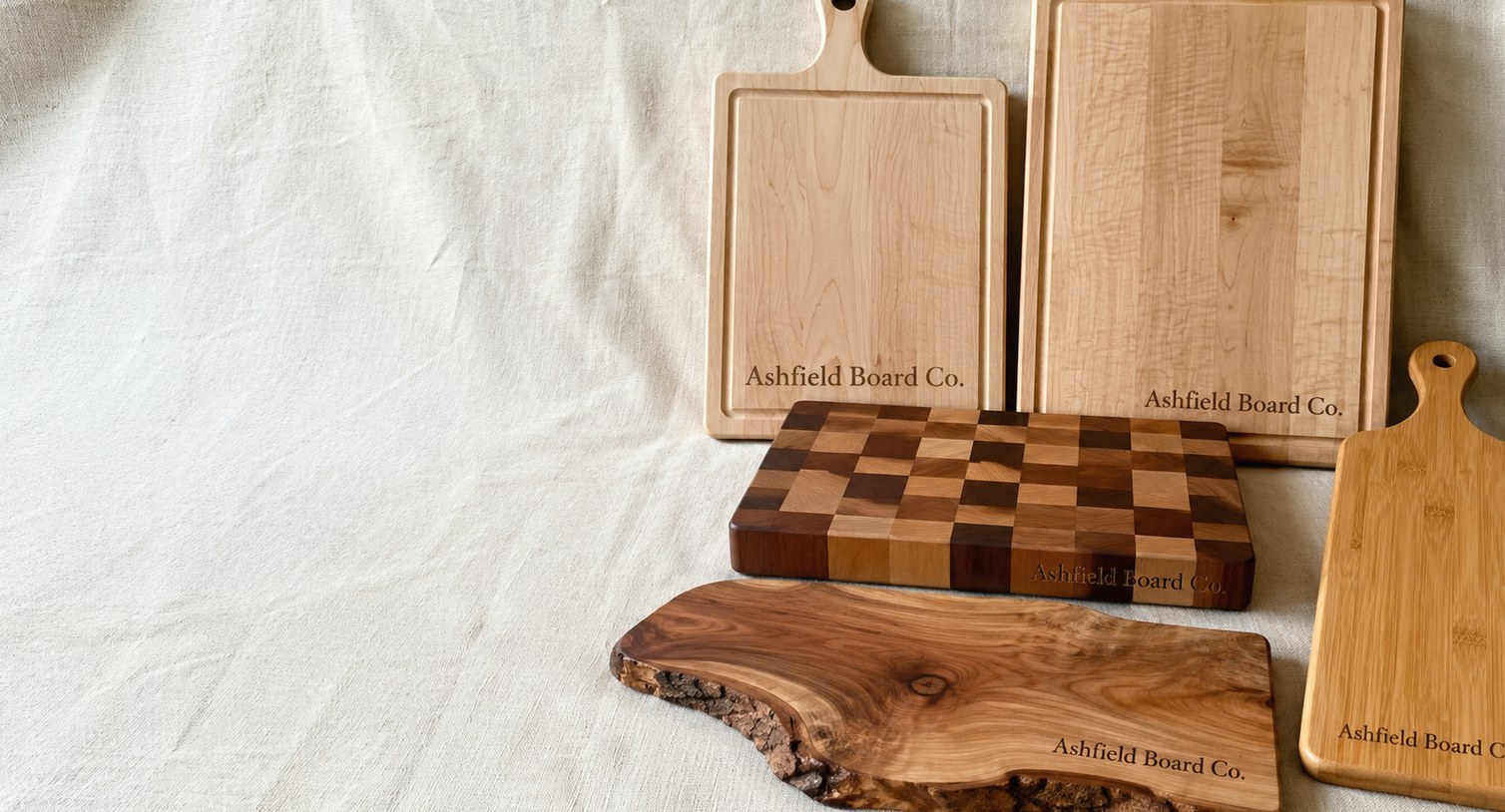
The right artwork for custom cutting boards is a vector logo, simplified to one color, placed where it clears the groove and handle. Customized Cutting Boards engraves hardwood, end-grain, bamboo and serving boards from your file, returns a free mockup within 24 hours with unlimited free revisions, and finishes in about 2 weeks after you approve.
- Vector files (AI, EPS, SVG, PDF) give the cleanest engraving
- Engraving is a single-tone burn, so one-color logos read best
- Artwork should clear juice grooves, handles and edges
- Free mockup within 24 hours with unlimited free revisions
- Pay nothing until you approve the design
What logo file should you send for a custom cutting board?
The best file for a custom cutting board is a vector version of your logo, saved as AI, EPS, SVG or a vector PDF. Vector artwork is built from paths rather than pixels, so the engraving laser follows clean edges at any board size, from a small bar board to a large end-grain butcher block. If a vector file is not available, send the largest, sharpest PNG or JPG you have.
Most marketing teams already have a vector logo in a brand folder or with whoever designed the website. Ask for the file your printer or sign maker uses, not the one pasted into email signatures. Email-signature logos and website headers are usually small raster images that look fine on a screen but lose detail when they are scaled up to fill the face of a cutting board.
If all you have is a low-resolution image, send it anyway with your quote request. Customized Cutting Boards reviews every file before the mockup, and the free mockup within 24 hours shows you exactly how your artwork reads on the board you picked. Problems surface on the mockup, not after production.
- Best: vector AI, EPS, SVG or PDF with text converted to outlines
- Workable: a large, sharp PNG with a transparent background
- Risky: screenshots, photos of signage, logos copied from social profiles
How does a full-color logo look when engraved on a cutting board?
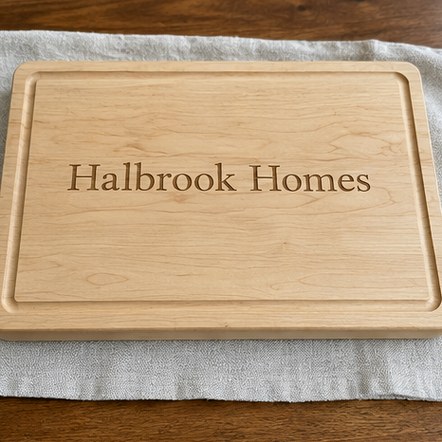
Laser engraving on a cutting board is a single-tone mark: the laser darkens the wood, so every color in your logo becomes the same warm brown burn. A full-color logo still works, but it is reproduced as one color against the natural wood, which is why a clean one-color version of the logo gives the sharpest result on engraved hardwood, bamboo and end-grain boards.
Logos that rely on color to separate shapes need the most attention. Two overlapping shapes in different colors merge into one shape once they are both engraved. Gradients, drop shadows and soft glows do not translate into burned wood the way they do on screen; they either flatten into a solid area or break into a speckled texture. A designer can usually solve this by switching to an outline or by adding a thin gap between shapes.
Logos printed on a dark or colored background raise a different question: should the background be engraved too? On a cutting board, a large engraved block often looks heavy, so most buyers choose a knockout version where only the logo marks are burned and the background is left as bare wood. If your brand guide includes a one-color or reversed version, include it with your file.
Wood choice also changes how the burn reads. Light woods such as maple show the strongest contrast, while darker woods such as walnut give a subtler, tone-on-tone mark that many buyers like for executive gifts. Bamboo engraves with its grain visible through the mark. HDPE commercial boards take a lighter, textured mark rather than a dark burn.
Where can artwork go on each cutting board style?
Artwork placement on a cutting board depends on the board style and on how the board will be used. A board meant for daily chopping usually carries the logo on the back or in a corner of the front so the cutting surface stays clear. A board meant for serving or display, such as a charcuterie board, can carry a larger centered design because the engraving is part of the presentation.
Features such as juice grooves, handle cutouts and rounded corners take space away from the engraving area. Text should never run across a groove, and a design that sits right against a handle hole tends to look crowded. When you request a quote, name the exact board you want so the mockup is drawn on that board’s real shape.
| Board style | Typical artwork position | Artwork tip |
|---|---|---|
| Edge-grain hardwood board | Front center or lower corner; back for a large logo | Leave room inside the juice groove if the board has one |
| End-grain butcher block | Front center or a side panel | Choose bold shapes; the checkerboard grain adds visual texture |
| Bamboo board | Front center or corner | Medium line weights read best against the striped grain |
| Charcuterie and serving board | Large centered design or a handle-end mark | A centered monogram or crest suits a display board |
| HDPE commercial board | Corner or top edge | Keep marks simple so they stay visible in a working kitchen |
Two-sided artwork is also possible: a common setup is the recipient’s name on the front and your company logo on the back, so the board feels personal without losing the brand.
Which fonts and line weights hold up when a cutting board is engraved?
Fonts on an engraved cutting board need clear, open letter shapes and enough stroke weight to burn cleanly into the grain. Simple serif and sans-serif fonts at a medium or bold weight stay readable from across a kitchen. Very thin script fonts, condensed typefaces and small all-caps taglines are the ones that most often blur into the wood grain, especially on bamboo and darker hardwoods.
Size matters as much as font choice. A slogan that reads well under a logo on a business card can become too small once it is placed on a board, because the rest of the design is scaled to suit the board rather than the line of text. As a rule of thumb, if a line of text looks tiny on the mockup at full screen, it will look tiny on the real board.
Personalized orders need one extra check. Long names, hyphenated surnames and job titles change the width of every line, so ask for the mockup to show the longest name on your list, not only the shortest. Customized Cutting Boards includes unlimited free revisions, so adjusting a font weight or spacing after the first mockup costs nothing and keeps the order moving.
- Use one or two fonts per board, not three or four
- Convert text to outlines in the vector file so the font cannot be substituted
- Spell out the exact capitalization you want for every name
- Avoid hairline outlines around letters
What should you check on a cutting board mockup before you approve it?
Before you approve a cutting board mockup, check spelling, artwork placement, scale and the board style itself, in that order. The mockup is the last point at which changes are free and fast; once you approve, Customized Cutting Boards moves the order into production and standard turnaround is about 2 weeks, with faster delivery possible through express shipping.
- Spelling and dates. Read every word aloud, including the tagline and any year. Misspellings are the most common reason a board has to be redone.
- Logo version. Confirm the mockup uses the current logo, not an older version pulled from a website.
- Placement. Check that the design clears the juice groove, handle and edges, and sits on the side you intended.
- Scale. Compare the logo size to the board size given on the mockup and picture it in a real kitchen.
- Names list. For personalized boards, confirm that the mockup shows a long name and that your spreadsheet has no blank rows.
- Board and wood. Make sure the board style, wood and any gift box match what you meant to order.
Send the mockup to the one person who owns the brand, and ask for a single consolidated reply. Feedback from several people in separate emails is how small errors slip through. You pay nothing until you approve the design.
What artwork mistakes slow down a first cutting board order?
The artwork mistakes that slow down a first custom cutting board order are almost always avoidable: sending a tiny logo file, asking for color on an engraved board, crowding too much text onto one face, and approving a mockup before the person who owns the brand has seen it. Each one adds a revision round or, worse, a remake after delivery.
- Sending the wrong logo. An outdated logo from an old website is a frequent surprise. Pull the file from your current brand guide.
- Expecting brand colors. Engraving is single-tone. Decide early whether a one-color version of your logo works for your team.
- Filling the whole board. A logo, a name and a short line is plenty. Paragraphs of text look busy and read poorly on grain.
- Ignoring the back. Putting the brand on the back frees the front for a name or message and keeps the cutting surface clean.
- Locking the names list too late. Personalized artwork cannot be finalized until the list is final, so changes after approval affect the schedule.
- Using licensed or third-party artwork without permission. Sports logos, characters and other brands’ marks need the owner’s approval.
If you are unsure about any of these, send what you have with your quote request. Customized Cutting Boards will point out artwork issues on the free mockup, and you can revise as many times as you need before approving.
Frequently asked questions
Can I send a screenshot or a photo of my sign for cutting board engraving?
A screenshot or a photo of a sign can be sent with a cutting board quote request, but it rarely produces the sharpest engraving because the edges are blurry when enlarged. Send it if that is all you have, and keep looking for the original vector file from your designer or printer. The mockup will show whether the image is clean enough for the board.
Should the background of my logo be engraved on a cutting board?
Most cutting board buyers leave the logo background as bare wood and engrave only the logo marks, a setup called a knockout version. Engraving a large solid background tends to look heavy and uneven on wood grain. If your logo usually sits on a colored panel, include a one-color or reversed version so the mockup can show the cleanest option.
Which fonts are easiest to read on an engraved cutting board?
Engraved cutting boards read best with simple serif or sans-serif fonts at a medium or bold weight. Very thin scripts, condensed fonts and small all-caps lines can blur into the wood grain, especially on bamboo or walnut. Limit the design to one or two fonts per board, and check the longest line of text on the mockup before you approve the order.
Does a juice groove limit where artwork can go on a cutting board?
A juice groove on a cutting board reduces the flat area available for engraving, and artwork should never cross the groove itself. Designs are normally placed inside the groove border, in a corner or on the back of the board. Name the exact board style in your quote request so the mockup from Customized Cutting Boards is drawn on that board's real layout.
Can a photograph be engraved on a wooden cutting board?
A photograph can be engraved on a wooden cutting board, but the result is a single-tone image made of burned dots, not a printed photo. High-contrast images with a clear subject work best, while busy backgrounds and dark scenes lose detail. Customized Cutting Boards can show the photo on a free mockup so you can decide whether a line drawing would suit the board better.
Can a QR code be engraved on a cutting board?
A QR code can be engraved on a cutting board, usually on the back or in a corner where it does not interfere with chopping. Keep the code large enough to scan easily, and point it to a short, permanent link. Test the code on the mockup with your phone, and remember that a board lasts for years, so the destination page should too.
What artwork details are easy to miss on a cutting board mockup?
Cutting board mockups most often hide small errors in taglines, years, capitalization and outdated logo versions. Read every line aloud, check that the design clears the groove and handle, and confirm the board style and wood are the ones you ordered. Customized Cutting Boards offers unlimited free revisions, so ask for changes rather than approving a mockup you are unsure about.
Do I need permission to engrave a sports team or licensed logo on cutting boards?
Cutting boards engraved with a sports team, character or another company's logo need permission from the owner of that trademark. Customized Cutting Boards engraves artwork that you own or are authorized to use. If you are ordering for a partner company, a short written approval from their marketing team is usually enough to move the order forward without delays.
Why should text be converted to outlines in cutting board artwork files?
Cutting board artwork with text converted to outlines keeps the exact letter shapes you chose, even if the font is not installed on the computer that opens the file. Live text can be swapped for a default font, which changes spacing and character. Customized Cutting Boards builds the mockup from your file, so outlined text means the board shows the typography your brand guide specifies.
How large should a logo be on a custom cutting board?
A logo on a custom cutting board should be large enough to read from across a kitchen but small enough to leave clear wood around it. A daily-use board usually suits a modest corner or back placement, while a serving board can carry a larger centered mark. Customized Cutting Boards shows the logo at its planned size on the free mockup within 24 hours.
Can a map or city skyline be engraved on a cutting board?
A map or city skyline can be engraved on a cutting board when the artwork is simplified into clear lines and solid shapes. Dense street grids and tiny labels tend to blur into the grain, so fewer streets and bolder outlines read better. Customized Cutting Boards places the design on a free mockup, letting you judge the detail level before anything is engraved.
What can go on a cutting board if a business has no logo file?
A cutting board for a business without a logo file can still look polished with the company name set in a clean font, a simple monogram or a short line of text. Send the exact wording and any colors or fonts you already use on signage. Customized Cutting Boards returns a free mockup within 24 hours, and you can request unlimited free revisions.
Get a free mockup for your cutting boards
Send your logo or idea and the quantity you have in mind. Customized Cutting Boards returns a free mockup within 24 hours, you approve the design before anything is produced, and standard turnaround is about two weeks with faster options available. Get a custom quote.